 Domestic hot water
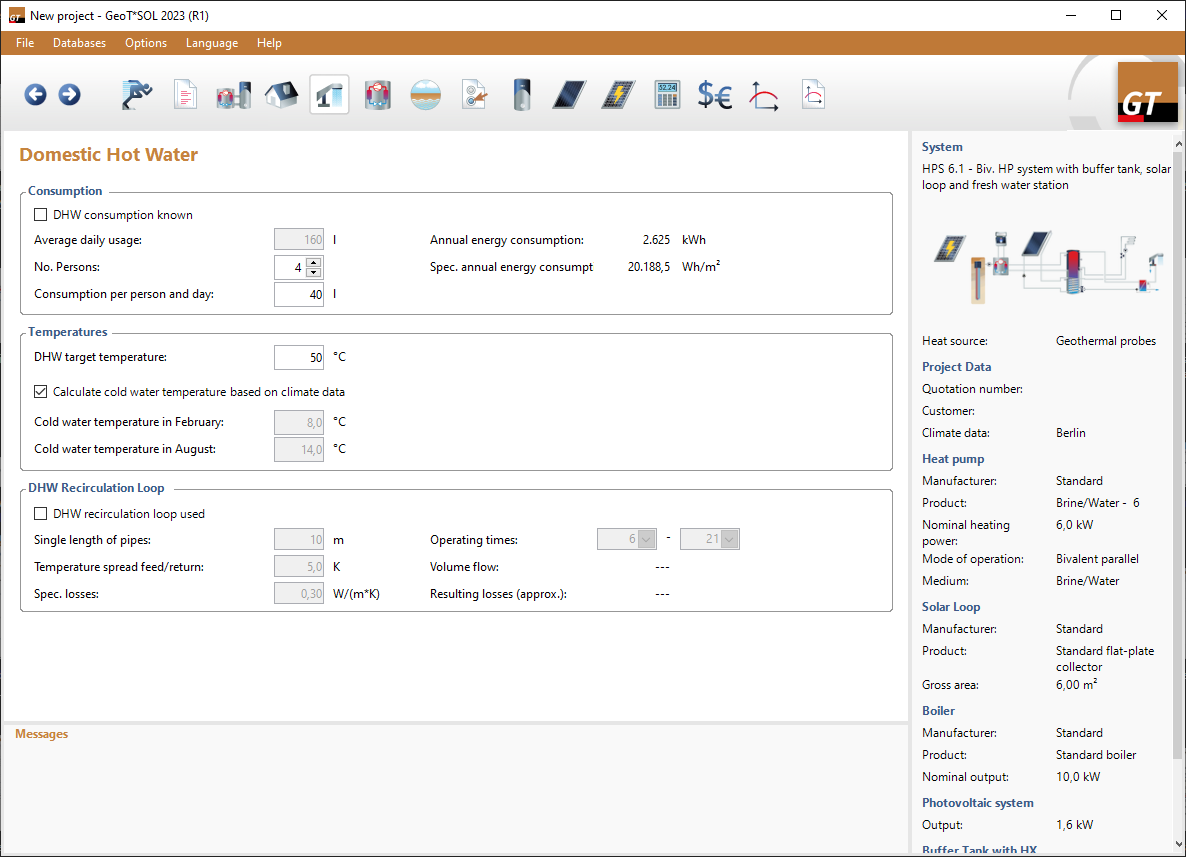
The heating energy requirement for domestic hot water is an essential parameter for the design of the heat pump.
Proceed as follows:
Consumption
- First, select the desired input type. You can specify the requirement in litres or kWh.
- Average daily usage:
Enter the average hot water consumption for one day in litres here. - Consumption per person and day:
Enter the number of people and the average daily consumption per person in litres. - Annual energy consumption:
Enter the energy requirement for the whole year in kWh. - Spec. annual energy consumption:
Enter the energy requirement per square metre in kWh. The heated usable area is defined on the Space Heating page.
- Average daily usage:
Temperatures
-
Enter the desired target temperature of the DHW.
The maximum possible temperature depends on the heat pump, the buffer storage tank and the control system. We recommend staying at least 8°C below the operating limit of the heat pump. Otherwise, the following effects may occur:- In monovalent systems, insufficient coverage
- In monoenergetic systems, more frequent use of the heating element.
- In bivalent systems, more frequent use of the boiler.
-
You can let the program calculate the
 cold water temperature based on climate data.
or
-
If you leave the
 calculate cold water temperature based on climate data checkbox unticked, you must enter both cold water temperatures for February and August yourself.
The difference between cold and hot water crucially affects the simulation results and the financial analysis.
A warning message appears if requirements are not met.
Circulation
The DHW supply can be operated with
or without
circulation.
Without circulation: longer warm-up times, lower energy consumption = lower costs
Circulation increases comfort, as the hot water is immediately available even with long pipeways, but the circulation losses increase the energy requirement. As a result, it impacts the simulation results and the financial analysis.
-
Define the circulation by setting the single length of pipes, the temperature spread feed/return, and the specific losses.
-
Define the operating times.
As a preliminary result, the resulting losses and the necessary volume flow are displayed. These can differ slightly from the simulation results.
Operation hours
Here you can specify when the DHW supply may be on and when it may be off. The colour green indicates that the DHW supply is in operation for the respective month.
Grey indicates that the DHW supply is not in operation for the respective month.
Pressing Details opens a dialogue in which you can define the daily operating times. By pressing the left mouse button and dragging
the mouse, you can select several days.