Heat pump selection

Select Heat Pump from the Manufacturer Database
You will see a table with heat pumps and options that simplify the selection process. Some of these options can be found in the context menu (right-click on a heat pump row).
The database dialog remembers your settings, such as column width, column visibility, and window size, and restores them the next time you open it.
Working with the heat pump database
-
Filter table
There are heat pump product types for each system type. Select a heat pump product type.
-
Search the table
Use Search to look up any term or name. -
Show older products
By default, the list shows only current products. To see older products as well, click Show older products. -
Sort the table To sort by a column (COP, Nominal output, …), left-click the column header.
-
Configure the table
To show or hide columns, right-click the column header.
-
Context menu
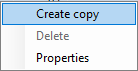
Right-click on a heat pump to access the context menu.
-
Create user-defined heat pump
Use the context menu to create a copy of a heat pump. Additionally, see: Heat pump